
DMS 기능 검증부터
Gaze / AOI 데이터 연동까지
하나로 시작하는 평가 패키지
DMS Evaluation Package for
Function Validation and
Gaze / AOI Data Integration
카메라, Edge AI, DMS SW, GUI, 데이터 출력 환경을 하나로 구성하여 DMS 기능 검증을 빠르게 시작하고, Advanced 옵션을 통해 Gaze / AOI 데이터, 좌표계 보정, JSON / Socket 출력 기반의 외부 시스템 연동까지 검토할 수 있습니다.
The package integrates camera, Edge AI, DMS software, GUI, and data output environment for quick DMS function validation, while the Advanced option supports Gaze / AOI data, coordinate calibration, and JSON / Socket output for external system integration.
- Basic: GUI 모니터링과 JSON 파일 기반의 빠른 DMS 기능 평가
- Basic: Quick DMS function validation with GUI monitoring and JSON file output
- Advanced: Gaze / AOI 데이터 출력, 좌표계 보정, JSON / Socket 연동 지원
- Advanced: Gaze / AOI data output, coordinate calibration, and JSON / Socket integration
- Integration: HMI, ECU, Logger, Simulator 등 외부 시스템 연동 검토 지원
- Integration: Supports integration review with HMI, ECU, Logger, Simulator, and external systems
Why Gaze / AOI-Ready Package?
왜 Gaze / AOI 연동형 DMS 평가 패키지가 필요한가?
Why Is a Gaze / AOI-Ready DMS Evaluation Package Needed?
DMS 평가는 단순 이벤트 확인에 그치지 않습니다. 운전자 시선 방향, AOI 진입 여부, 주의 분산 상태, 좌표계 기반 데이터 출력까지 확인하려면 카메라 세팅, Edge AI 구성, 알고리즘 연동, GUI 개발, 데이터 출력 및 외부 시스템 연동 환경이 필요합니다.
DMS evaluation is not limited to simple event detection. To review driver gaze direction, AOI entry status, distraction status, and coordinate-based data output, teams need camera setup, Edge AI configuration, algorithm integration, GUI development, data output, and external system integration.
초기 구축 부담 감소
Reduced Setup Burden
카메라, Edge AI, DMS SW, GUI, 데이터 출력 환경을 통합 제공하여 별도 개발 환경 구축 부담을 줄입니다.
Provides camera, Edge AI, DMS software, GUI, and data output environment to reduce separate development setup effort.
Gaze / AOI 데이터 활용
Gaze / AOI Data Utilization
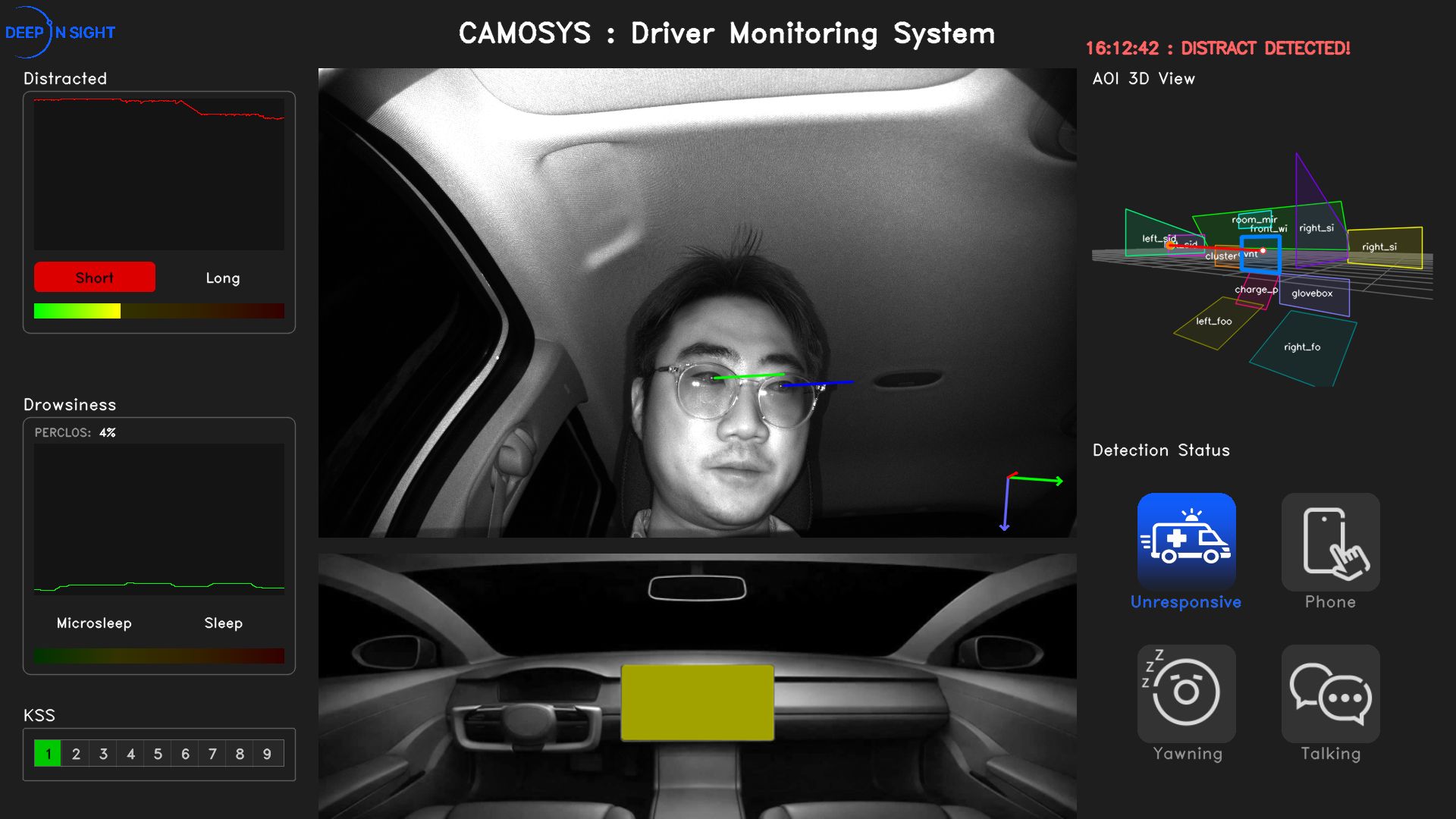
운전자 시선 방향, AOI 진입 여부, 주의 분산 상태를 GUI와 데이터 출력 기반으로 검토할 수 있습니다.
Review gaze direction, AOI entry status, and distraction status through GUI monitoring and data output.
외부 시스템 연동 검토
External Integration Review
Advanced 옵션에서 JSON / Socket 출력을 통해 HMI, ECU, Logger, Simulator 연동 가능성을 검토할 수 있습니다.
The Advanced option supports JSON / Socket output for reviewing integration with HMI, ECU, Logger, and Simulator.
Package Overview
DMS 기능 검토와 Gaze / AOI 연동에 필요한 핵심 환경을 하나의 패키지로 제공합니다
Integrated environment for DMS review and Gaze / AOI integration
카메라, Edge AI 시스템, DMS 런타임, GUI Dashboard, 데이터 출력 기능을 포함하여 복잡한 개발 환경 없이 DMS 기능 평가와 Gaze / AOI 데이터 검토를 시작할 수 있습니다.
The package includes camera hardware, edge AI system, DMS runtime, GUI dashboard, and data output features to reduce setup effort and accelerate DMS validation and Gaze / AOI data review.
Advanced Data Capabilities
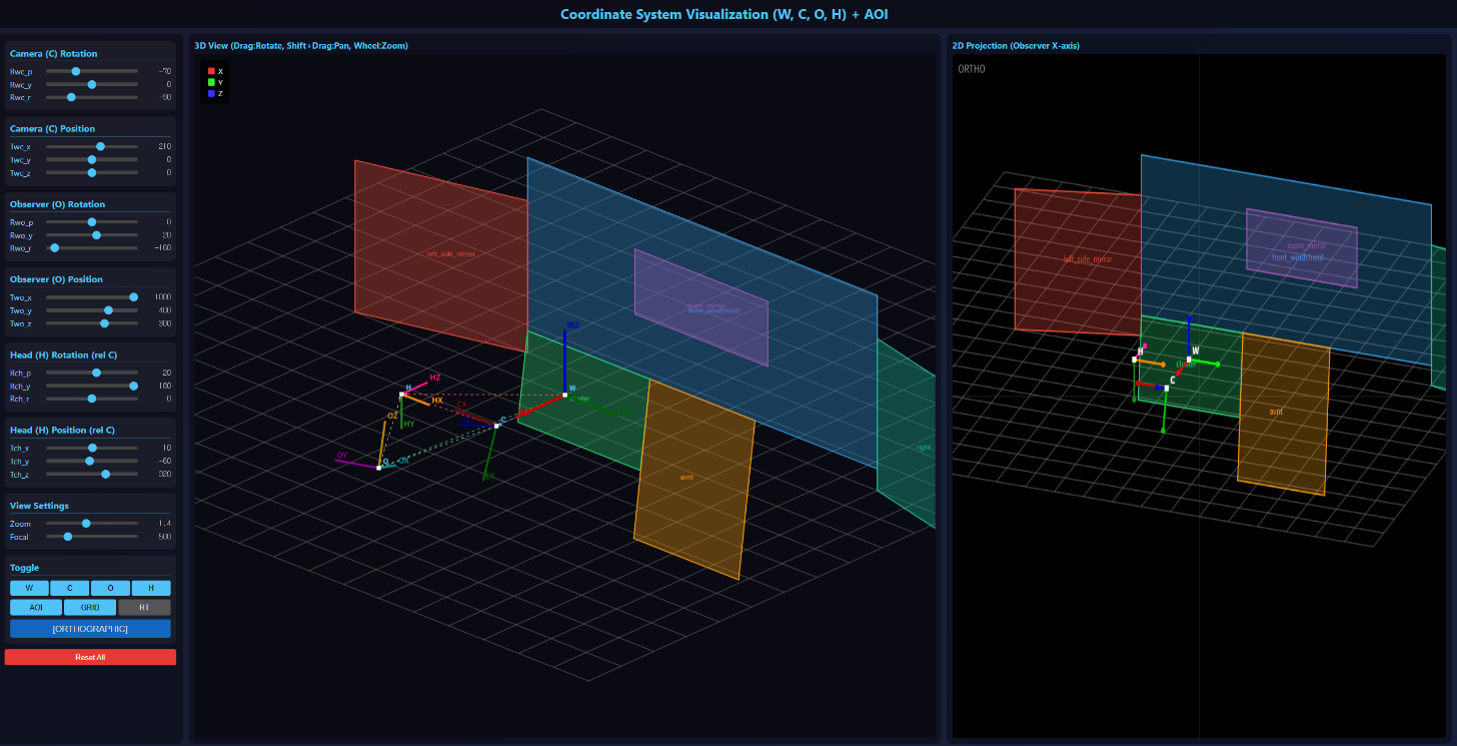
Gaze Data, AOI 설정 및 차량 인테리어 좌표계 보정
Gaze Data, AOI Configuration & Vehicle Coordinate Calibration
Advanced Package는 단순 DMS 기능 확인을 넘어 운전자 시선 데이터 확보, AOI 재정의, 차량 실내 구조 기준의 좌표계 보정을 통해 다양한 평가 현장에 활용할 수 있습니다.
Advanced Package goes beyond basic DMS validation by enabling gaze data output, AOI redefinition, and vehicle interior coordinate calibration for various evaluation environments.
Gaze Data 출력
Gaze Data Output
운전자의 시선 방향, 주시 상태, AOI 진입 여부 등을 분석하고 외부 시스템에서 활용할 수 있도록 데이터를 제공합니다.
Provides gaze direction, attention status, and AOI-related data for analysis and external system utilization.
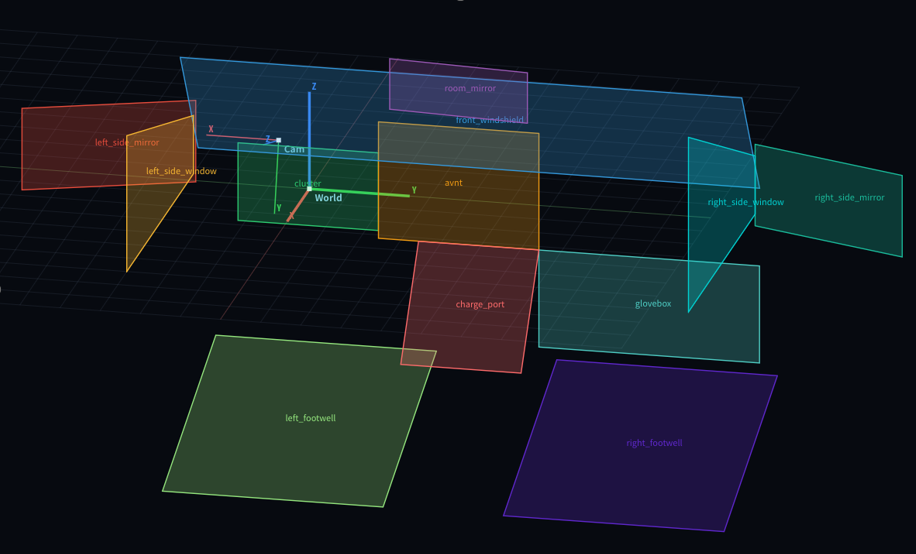
AOI 설정 및 재정의
AOI Configuration
클러스터, 센터 디스플레이, 룸미러, 사이드미러 등 차량 실내 구조와 연구 목적에 맞춰 AOI를 조정할 수 있습니다.
AOI regions can be adjusted according to vehicle interior layout and research purposes such as cluster, center display, and mirrors.
차량 좌표계 보정
Coordinate Calibration
카메라 좌표계 기준의 운전자 얼굴/시선 데이터를 차량 실내 구조 기준으로 보정하여 HMI/평가 시스템 연동성을 높입니다.
Calibrates camera-coordinate driver face/gaze data to vehicle interior coordinates for HMI and evaluation system integration.
JSON / Socket 연동
JSON / Socket Integration
HMI, ECU, Logger, Simulator 등 외부 시스템에 DMS 상태와 이벤트 데이터를 연동할 수 있습니다.
Supports DMS status and event data integration with HMI, ECU, logger, simulator, and external systems.
Package Options
Basic은 빠른 기능 검토, Advanced는 Gaze / AOI 데이터 연동에 적합합니다
Basic for quick review, Advanced for Gaze / AOI data integration
Basic은 GUI와 JSON 파일 기반의 빠른 DMS 기능 확인에 적합하며, Advanced는 Gaze / AOI 데이터, 좌표계 보정, JSON / Socket 출력 기반의 외부 시스템 연동 검토에 적합합니다.
Basic is suitable for quick DMS review through GUI and JSON file output, while Advanced is designed for Gaze / AOI data, coordinate calibration, and JSON / Socket-based external system integration.
빠른 DMS 기능 평가
Quick DMS Function Validation
GUI를 통해 핵심 DMS 기능을 빠르게 확인하고, JSON 파일 기반 결과 리뷰가 필요한 고객에게 적합합니다.
Suitable for customers who need quick DMS function review through GUI monitoring and JSON file-based result review.
- GUI 기반 운전자 상태 및 이벤트 모니터링
- GUI-based driver status and event monitoring
- JSON 파일 기반 결과 데이터 확인
- JSON file-based result review
- 운전자 감지, 주의/졸음, 행동 감지 기능 검토
- Driver presence, attention/drowsiness, and behavior detection review
- LH/RH 운전석 설정 및 AOI 확인 지원
- LH/RH driver seat configuration and AOI review support
- 카메라 좌표계 기준 3D 운전자 얼굴 위치 제공
- 3D driver face position based on camera coordinates
DMS 시험 및 외부 시스템 연동
DMS Testing & System Integration
Gaze / AOI 데이터, 파라미터 설정, JSON / Socket 출력 기반으로 HMI, ECU, Logger, Simulator 등 외부 시스템 연동 검토가 필요한 고객에게 적합합니다.
Suitable for customers who need external system integration review with HMI, ECU, Logger, and Simulator through Gaze / AOI data, parameter setting, and JSON / Socket output.
- Basic Package 기능 전체 포함
- Includes all Basic Package functions
- Gaze Data 출력 및 분석 지원
- Gaze data output and analysis support
- AOI 설정 및 불필요 영역 제외/재정의
- AOI configuration and unnecessary region exclusion/redefinition
- 차량 인테리어 좌표계 보정 지원
- Vehicle interior coordinate calibration support
- Distraction / Drowsiness 판단 조건 파라미터 설정
- Parameter setting for distraction and drowsiness conditions
- HMI, ECU, Logger, Simulator 연동 검토
- Integration review with HMI, ECU, logger, and simulator
Key Functions
Gaze / AOI 데이터 활용 중심의 주요 평가 기능
Key Evaluation Functions Focused on Gaze / AOI Data Utilization
Gaze / AOI 데이터 출력, 좌표계 보정, JSON / Socket 연동을 중심으로 DMS 기본 기능과 개발 단계 사전 평가까지 지원합니다.
Supports Gaze / AOI data output, coordinate calibration, JSON / Socket integration, core DMS function review, and development-stage pre-assessment.
Gaze / AOI Data Output
- 운전자 시선 방향, 주시 상태, AOI 진입 여부 데이터 출력
- Outputs driver gaze direction, attention status, and AOI entry data
- HMI / UX 연구, 주의 분산 분석, 시선 기반 평가에 활용
- Supports HMI / UX research, distraction analysis, and gaze-based evaluation
Coordinate Calibration
- 카메라 좌표계 기준 3D 운전자 얼굴/시선 데이터 제공
- Provides 3D driver face/gaze data based on camera coordinates
- 차량 인테리어 구조 기준의 좌표계 보정 지원
- Supports coordinate calibration based on vehicle interior layout
JSON / Socket Integration
- Basic: JSON 파일 기반 결과 데이터 확인
- Basic: JSON file-based result review
- Advanced: JSON / Socket 기반 외부 시스템 데이터 연동
- Advanced: JSON / Socket-based data integration with external systems
Driver State & Behavior Detection
- 운전자 존재 여부, 얼굴 상태, 주의 및 졸음 모니터링
- Driver presence, face status, attention and drowsiness monitoring
- 휴대폰 사용, 하품, 대화 등 행동 감지 이벤트 검토
- Behavior event review including phone use, yawning, and talking
GUI Monitoring
- 운전자 상태, Gaze / AOI, 졸음, 부주의, 행동 감지 결과를 GUI에서 확인
- Reviews driver state, Gaze / AOI, drowsiness, distraction, and behavior results through GUI
- 고객 데모, 내부 기술 검토, 벤치 평가에 활용
- Applicable to customer demos, internal technical review, and bench evaluation
EU GSR / Euro NCAP-Oriented Pre-Assessment
- EU GSR DDAW / ADDW 및 Euro NCAP 대응 개발 방향의 사전 검토 지원
- Supports pre-assessment for EU GSR DDAW / ADDW and Euro NCAP-oriented development
- 주의, 졸음, 부주의, 무반응 운전자 모니터링 기능 검토
- Reviews attention, drowsiness, distraction, and unresponsive driver monitoring functions
DMS Functions
운전자 상태 및 행동 감지 기능
Driver State and Behavior Detection Functions
DMS 평가에 필요한 핵심 운전자 상태 및 행동 이벤트를 GUI와 데이터 출력 기반으로 검토할 수 있습니다. 일부 기능은 개발 중이며, 실제 제공 범위는 패키지 옵션 및 프로젝트 조건에 따라 달라질 수 있습니다.
Core driver state and behavior events for DMS evaluation can be reviewed through GUI visualization and data output. Some functions are in development, and the actual scope may vary depending on package options and project conditions.







Reference System Configuration
기준 시스템 구성 및 하드웨어 사양
Reference System Configuration & Hardware Specifications
DMS IR Camera 및 Jetson Orin System 기준 사양입니다. 패키지 구성과 사양은 프로젝트 요구사항 및 공급 조건에 따라 변경될 수 있습니다.
Reference specifications for the DMS IR Camera and Jetson Orin System. Specifications and package configuration may be subject to change depending on project requirements and supply conditions.
DMS IR Camera
| Sensor | OmniVision OV2311 / 2.3MP HDR |
|---|---|
| Resolution | 1600(H) × 1200(V) |
| Output Format | RAW 10-bit |
| Field of View | 55.3°(H) × 45.6°(V) × 70°(D) |
| VCSEL | Included, 940 nm / 4.5 W × 1 |
| Serializer / Connector | Maxim MAX96717F / FAKRA Z Type |
| Dimensions / Weight | 50mm × 40mm × 25mm / 80g |
| Operating Temp / IP Rating | -45°C ~ +85°C / IP52 |
Jetson Orin System
| AI Accelerator | NVIDIA® Jetson Orin Nano™ |
|---|---|
| CPU | 6-core Arm® Cortex®-A78AE |
| Memory / Storage | 4GB LPDDR5 / 128GB M.2 SSD |
| I/O Ports | HDMI, GbE LAN, USB 3.2 ×2, USB 2.0 ×2 |
| Serial / Bus | RS-232/485, CAN Bus FD ×1 |
| OS Support | Linux, NVIDIA JetPack™ 6.2 |
| Power Input | 12V–24V DC-in |
| Dimensions | 105mm × 90mm × 52mm |
| Environment | -15°C ~ 60°C, IEC 60068-2 |
Applications and Target Customers
Gaze / AOI 데이터 활용 중심의 활용 분야 및 대상 고객
Applications and Target Customers Focused on Gaze / AOI Data Utilization
HMI / UX 연구, 운전자 주의 분산 분석, 시뮬레이터·Logger 연동, 차량 평가, PoC 및 선행개발 환경에서 활용할 수 있습니다.
Applicable to HMI / UX research, driver distraction analysis, simulator and logger integration, vehicle evaluation, PoC, and pre-development environments.
Gaze / AOI 기반 HMI·UX 연구
Gaze / AOI-based HMI and UX Research
운전자 시선 데이터와 AOI 정보를 활용하여 차량 HMI, 표시 위치, 운전자 반응 연구에 적용할 수 있습니다.
Apply driver gaze and AOI data to vehicle HMI, display placement, and driver response research.
운전자 주의 및 부주의 데이터 분석
Driver Attention and Distraction Data Analysis
Gaze / AOI, 졸음, 부주의, 행동 감지 결과를 기반으로 운전자 상태 분석과 평가 시나리오 검토가 가능합니다.
Analyze driver state and review evaluation scenarios based on Gaze / AOI, drowsiness, distraction, and behavior detection results.
Simulator 및 Logger 연동
Simulator and Logger Integration
JSON / Socket 기반 출력으로 시뮬레이터, Logger, 데이터 수집 시스템과의 연동을 검토할 수 있습니다.
Review integration with simulators, loggers, and data collection systems using JSON / Socket output.
차량 및 벤치 환경 DMS 기능 검증
Vehicle and Bench-Level DMS Function Validation
실차 및 벤치 환경에서 DMS 기능 동작 여부와 이벤트 결과를 빠르게 검토할 수 있습니다.
Quickly review DMS function operation and event results in real vehicle and bench environments.
EU GSR / Euro NCAP 대응 개발 사전 검토
EU GSR / Euro NCAP-Oriented Pre-Assessment
DDAW / ADDW 및 Euro NCAP 대응 개발을 위한 사전 평가 환경으로 활용할 수 있습니다.
Use as a pre-assessment environment for DDAW / ADDW and Euro NCAP-oriented development.
PoC 및 선행개발 검토
PoC and Pre-Development Review
OEM / Tier-1 선행개발팀, 대학 및 연구기관, HMI / UX 연구팀의 고객 데모와 PoC에 활용할 수 있습니다.
Applicable to customer demos and PoC programs for OEM / Tier-1 pre-development teams, universities, research institutes, and HMI / UX research teams.
Demo and Media
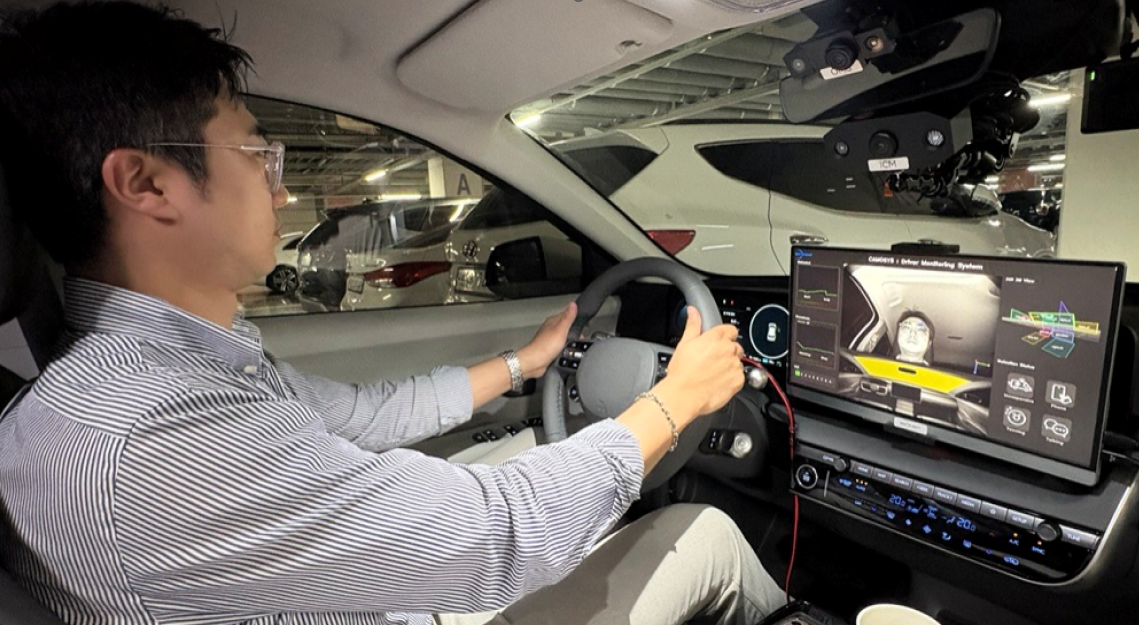
GUI 데모 및 실차 설치 이미지
GUI Demo and Vehicle Installation Image
GUI 화면과 실차 설치 예시를 통해 평가 환경 구성을 직관적으로 확인할 수 있습니다.
Review the evaluation setup through GUI screen and real vehicle installation examples.
FAQ
DMS Package FAQ
DMS Package FAQ
제품 구성, 카메라, Jetson Orin 시스템, DMS 소프트웨어, 외부 시스템 연동 및 연구 활용에 대한 주요 질문을 한 페이지에서 확인할 수 있습니다.
Review key questions about package configuration, camera setup, Jetson Orin system, DMS software, external integration, and research use cases in one page.
1. 패키지 / 제품 FAQ1. Package / Product FAQ제품 구성, Basic/Advanced 차이, 평가용/양산용 구분, 구매 전 확인사항Package configuration, Basic/Advanced differences, evaluation/production scope, and pre-purchase checklist
DMS Evaluation Package는 어떤 제품인가요?What is the DMS Evaluation Package?
DMS Evaluation Package는 카메라, Edge AI, DMS SW, GUI, 데이터 출력 환경을 하나로 구성하여 별도 개발 환경 구축 없이 DMS 기능 검토를 빠르게 시작하고, Advanced 옵션을 통해 Gaze / AOI 데이터와 외부 시스템 연동까지 검토할 수 있도록 지원하는 평가용 패키지입니다.
The DMS Evaluation Package is an evaluation package that integrates camera, Edge AI, DMS software, GUI, and data output environment, enabling quick DMS function review without building a separate development environment. The Advanced option also supports Gaze / AOI data and external system integration review.
본 패키지는 양산용인가요, 평가용인가요?Is this package for production or evaluation?
기본 목적은 평가, 데모, PoC, 연구 및 사전 검토입니다. 양산 적용이 필요한 경우 고객 요구사항, 차량 환경, 기능 범위, 품질/규격 조건을 별도로 정의하여 양산 개발 검토로 확장할 수 있습니다.
The primary purpose is evaluation, demonstration, PoC, research, and pre-development review. For production use, customer requirements, vehicle environment, function scope, quality requirements, and specifications must be defined separately for production development review.
패키지에는 어떤 구성품이 포함되나요?What components are included in the package?
- IR DMS Camera
- Jetson Orin 기반 엣지 플랫폼
- DMS Software Runtime
- GUI Dashboard
- API/JSON 데이터 출력
- 기본 설치 및 평가 가이드
- IR DMS Camera
- Jetson Orin-based edge platform
- DMS Software Runtime
- GUI Dashboard
- API/JSON data output
- Basic installation and evaluation guide
Basic과 Advanced 옵션의 차이는 무엇인가요?What is the difference between Basic and Advanced?
Basic은 기본 DMS 기능 검증, GUI 확인, JSON 출력 확인에 적합합니다. Advanced는 고객 차량 환경에 맞춘 AOI 설정, 좌표계 보정, 시선 데이터 수집, 졸음 판단 조건 조정 등 고급 커스터마이징을 포함할 수 있습니다.
Basic is suitable for core DMS function validation, GUI review, and JSON output checks. Advanced can include customer-specific customization such as AOI setup, coordinate calibration, gaze data collection, and drowsiness condition tuning.
구매 전 어떤 정보를 확인해야 하나요?What should be checked before purchase?
- 평가 목적과 필요 기능
- 벤치/실차/시뮬레이터 사용 환경
- 카메라 장착 위치 및 운전자 위치 조건
- 필요한 데이터 출력 형식
- 외부 장비 또는 상위 시스템 연동 여부
- Basic/Advanced 옵션 필요 여부
- Evaluation purpose and required functions
- Bench, vehicle, or simulator environment
- Camera mounting position and driver position conditions
- Required data output format
- Integration with external devices or higher-level systems
- Need for Basic or Advanced options
대학 연구실이나 연구기관에서도 사용할 수 있나요?Can universities and research institutes use it?
가능합니다. 자율주행 AI, 운전자 상태 인식, HMI, 시선 추적, 차량 안전, 컴퓨터 비전 연구에서 벤치 테스트나 시뮬레이터 환경으로 활용할 수 있습니다.
Yes. It can be used in autonomous driving AI, driver state recognition, HMI, gaze tracking, vehicle safety, and computer vision research using bench test or simulator environments.
설치 후 바로 사용할 수 있나요?Can it be used immediately after installation?
기본 구성은 빠른 평가를 목표로 제공됩니다. 다만 카메라 위치, 조명 환경, 운전자 위치, 네트워크/모니터 연결 조건에 따라 초기 설정 및 캘리브레이션 확인이 필요할 수 있습니다.
The package is designed for rapid evaluation. However, initial setup and calibration checks may be required depending on camera position, lighting, driver position, network, and monitor connection conditions.
라이선스나 SW 사용 범위는 어떻게 정해지나요?How is the software license or usage scope defined?
SW 사용 범위는 공급 조건, 사용 목적, 설치 장비 수, 배포 범위에 따라 별도 협의가 필요합니다. 연구/평가용과 상용/양산용 조건은 구분될 수 있습니다.
The software usage scope must be discussed based on supply conditions, intended use, number of installed devices, and distribution scope. Research/evaluation use and commercial/production use may have different terms.
2. Gaze / AOI / 데이터 출력 FAQ2. Gaze / AOI / Data Output FAQGUI, JSON, Socket, Gaze Data, AOI, 좌표계 보정, 파라미터 설정GUI, JSON, Socket, gaze data, AOI, coordinate calibration, and parameter settings
GUI에서는 어떤 정보를 확인할 수 있나요?What information can be checked in the GUI?
운전자 얼굴/랜드마크, Head Pose, Gaze/AOI, 졸음/주의 분산 상태, Face ID, 행동 감지 이벤트, 상태 로그 등을 시각적으로 확인할 수 있습니다.
The GUI can visualize driver face/landmarks, head pose, gaze/AOI, drowsiness/distraction status, Face ID, behavior detection events, and status logs.
JSON 데이터 출력이 가능한가요?Is JSON data output supported?
가능합니다. 이벤트 상태, 주요 인식 결과, 일부 수치 데이터 등을 JSON 형태로 출력하여 외부 시스템에서 확인할 수 있습니다.
Yes. Event status, key recognition results, and selected numerical data can be output in JSON format for external system review.
Socket 통신을 지원하나요?Is Socket communication supported?
프로젝트 조건에 따라 Socket 기반 데이터 출력을 검토할 수 있습니다. IP, Port, 메시지 구조, 출력 주기, 연결 방식은 별도 정의가 필요합니다.
Socket-based data output can be reviewed depending on project conditions. IP, port, message structure, output frequency, and connection method must be defined separately.
Gaze Data를 수집할 수 있나요?Can gaze data be collected?
Advanced 옵션에서 시선 방향, AOI, 관련 좌표 정보 등 Gaze Data 수집 및 분석 지원을 협의할 수 있습니다.
With the Advanced option, gaze direction, AOI, and related coordinate information can be discussed for gaze data collection and analysis.
AOI 설정이 가능한가요?Can AOI be configured?
가능합니다. 기본 AOI 외에 차량 인테리어 구조와 평가 목적에 맞춰 AOI 영역을 조정할 수 있습니다. Advanced 옵션에서 주로 검토됩니다.
Yes. In addition to default AOI settings, AOI regions can be adjusted according to vehicle interior structure and evaluation purpose. This is mainly reviewed under the Advanced option.
좌표계 보정이 필요한 이유는 무엇인가요?Why is coordinate calibration required?
카메라 위치, 운전자 위치, 차량 인테리어 기준점이 달라지면 시선/AOI 판단 기준도 달라집니다. 정확한 분석을 위해 차량 환경 기준의 좌표계 보정이 필요할 수 있습니다.
When camera position, driver position, and vehicle interior reference points change, gaze/AOI judgment criteria also change. Coordinate calibration based on the vehicle environment may be required for accurate analysis.
졸음 판단 조건을 변경할 수 있나요?Can drowsiness judgment conditions be changed?
Advanced 옵션에서 KSS Level 또는 고객 평가 기준에 맞춰 졸음 판단 조건, 이벤트 임계값, 지속 시간 조건 등을 조정할 수 있습니다.
With the Advanced option, drowsiness conditions, event thresholds, and duration criteria can be adjusted based on KSS Level or customer evaluation criteria.
3. 카메라 FAQ3. Camera FAQ카메라 설치 위치, 클러스터 장착, LH/RH, IR, 안경/선글라스, 벤치/실차 사용Camera mounting, cluster installation, LH/RH, IR, glasses/sunglasses, bench and vehicle use
기준 카메라 장착 위치는 어디인가요?What is the reference camera mounting position?
기준 장착 위치는 Instrument Cluster 영역입니다. 운전자 얼굴과 눈 영역을 안정적으로 확보할 수 있는 위치를 기준으로 평가 환경을 구성합니다.
The reference mounting position is the Instrument Cluster area. The evaluation setup is based on a position that can reliably capture the driver's face and eye region.
카메라 위치를 변경할 수 있나요?Can the camera position be changed?
가능하나 별도 검토가 필요합니다. 위치 변경 시 얼굴 가림, 화각, 거리, 시선 추정 정확도, 좌표계 설정, AOI 정의가 달라질 수 있습니다.
Yes, but it requires separate review. Changing the position may affect facial occlusion, field of view, distance, gaze estimation accuracy, coordinate setup, and AOI definition.
LH/RH 차량 모두 사용할 수 있나요?Can it be used for both LH and RH vehicles?
평가 목적에 따라 LH/RH 조건을 검토할 수 있습니다. 운전석 위치가 바뀌면 카메라 위치, 좌표계, AOI, 시선 기준값 확인이 필요합니다.
LH/RH conditions can be reviewed depending on the evaluation purpose. When the driver seat position changes, camera position, coordinate system, AOI, and gaze reference values should be checked.
IR 카메라를 사용하는 이유는 무엇인가요?Why does the package use an IR camera?
IR 카메라는 야간, 저조도, 실내 조명 변화 환경에서 운전자 얼굴과 눈 영역을 안정적으로 인식하는 데 유리합니다.
An IR camera is advantageous for reliably recognizing the driver's face and eye region under nighttime, low-light, and changing cabin lighting conditions.
안경이나 선글라스 착용 시에도 동작하나요?Does it work with glasses or sunglasses?
일반 안경 착용 조건은 평가할 수 있습니다. 다만 진한 선글라스, 반사 렌즈, 눈 영역 가림이 심한 조건에서는 시선 및 눈 개방도 추정 성능이 제한될 수 있습니다.
General glasses-wearing conditions can be evaluated. However, dark sunglasses, reflective lenses, or severe eye-region occlusion may limit gaze and eye-openness estimation performance.
벤치 테스트 환경에서도 카메라를 사용할 수 있나요?Can the camera be used in a bench test environment?
가능합니다. 다만 벤치 환경에서는 실제 차량과 운전자 거리, 카메라 높이, 각도, 조명 조건이 다르므로 결과 해석 시 이를 고려해야 합니다.
Yes. However, in a bench environment, driver distance, camera height, angle, and lighting may differ from a real vehicle, so this should be considered when interpreting results.
실차 평가에도 사용할 수 있나요?Can it be used for real-vehicle evaluation?
가능합니다. 실차에서는 전원, 고정 브라켓, 케이블 라우팅, 화면 출력, 데이터 저장, 안전한 설치 상태 등을 함께 확인해야 합니다.
Yes. In a real vehicle, power, mounting bracket, cable routing, display output, data storage, and safe installation conditions should be checked together.
카메라 설치 후 캘리브레이션이 필요한가요?Is calibration required after camera installation?
평가 기능에 따라 필요할 수 있습니다. 특히 AOI, Gaze, 좌표계 기반 분석은 카메라 위치와 차량 인테리어 기준점에 따라 보정이 필요할 수 있습니다.
It may be required depending on the evaluation functions. In particular, AOI, gaze, and coordinate-based analysis may require calibration based on the camera position and vehicle interior reference points.
4. Jetson Orin 시스템 FAQ4. Jetson Orin System FAQ전원, 부팅, 모니터 연결, 네트워크, 저장, 발열, 외부 인터페이스Power, booting, display, network, storage, thermal conditions, and external interfaces
Jetson Orin 시스템은 어떤 역할을 하나요?What role does the Jetson Orin system play?
Jetson Orin 시스템은 카메라 입력을 받아 DMS 소프트웨어를 실행하고, GUI 표시와 JSON/API 데이터 출력을 처리하는 엣지 AI 플랫폼입니다.
The Jetson Orin system is the edge AI platform that receives camera input, runs the DMS software, displays the GUI, and handles JSON/API data output.
전원 입력 조건은 어떻게 되나요?What are the power input requirements?
공급 구성에 따라 다를 수 있으나, 일반적으로 12V~24V DC-in 조건을 기준으로 검토합니다. 실제 차량 적용 시 전원 안정성, 노이즈, 접지 조건을 함께 확인해야 합니다.
It may vary depending on the supplied configuration, but 12V–24V DC-in is generally reviewed as the reference condition. For vehicle use, power stability, noise, and grounding should also be checked.
부팅 후 자동 실행이 가능한가요?Can the system run automatically after booting?
평가 목적에 따라 자동 실행 구성을 검토할 수 있습니다. 시스템 시작 후 GUI 또는 DMS Runtime이 자동으로 실행되도록 설정할 수 있습니다.
Auto-run configuration can be reviewed depending on the evaluation purpose. The GUI or DMS Runtime can be configured to start automatically after system boot.
모니터 연결은 어떻게 하나요?How is a monitor connected?
HDMI 출력 기반으로 GUI를 표시할 수 있습니다. 모니터 해상도와 출력 설정에 따라 GUI 화면 배치가 달라질 수 있습니다.
The GUI can be displayed via HDMI output. GUI layout may vary depending on monitor resolution and display settings.
네트워크 연결이 필요한가요?Is network connection required?
기본 구동에는 네트워크가 필수는 아닐 수 있으나, 원격 접속, 데이터 전송, Socket/API 연동, 로그 확인에는 유선 LAN 또는 네트워크 설정이 필요할 수 있습니다.
Network connection may not be mandatory for basic operation, but wired LAN or network setup may be required for remote access, data transfer, Socket/API integration, and log review.
데이터 저장은 가능한가요?Can data be stored?
JSON, 이벤트 로그, 평가 결과 등은 설정에 따라 저장할 수 있습니다. 저장 용량과 파일 관리 정책은 평가 목적에 맞춰 사전에 정하는 것이 좋습니다.
JSON, event logs, and evaluation results can be stored depending on settings. Storage capacity and file management policy should be defined according to the evaluation purpose.
CAN/Ethernet 같은 외부 인터페이스 연동이 가능한가요?Can external interfaces such as CAN or Ethernet be used?
Jetson Orin 시스템에서 제공하는 인터페이스 범위 내에서 연동을 검토할 수 있습니다. 실제 프로토콜, 데이터 포맷, 주기, 메시지 정의는 별도 협의가 필요합니다.
Integration can be reviewed within the available interface scope of the Jetson Orin system. Actual protocol, data format, frequency, and message definition require separate discussion.
5. 연동 / 연구 FAQ5. Integration / Research FAQHMI, ECU, Logger, Simulator 연동, GT Reference, Euro NCAP / EU GSR 기반 검토HMI, ECU, Logger, Simulator integration, GT reference, and Euro NCAP / EU GSR-oriented review
HMI 시스템과 연동할 수 있나요?Can it be integrated with an HMI system?
가능합니다. JSON/API/Socket 출력 기반으로 HMI에서 운전자 상태, 이벤트, 경고 조건을 표시하는 구조를 검토할 수 있습니다.
Yes. Integration can be reviewed using JSON/API/Socket output so that the HMI can display driver status, events, and warning conditions.
차량 ECU와 연동할 수 있나요?Can it be integrated with a vehicle ECU?
연동 검토는 가능합니다. 실제 ECU 연동은 인터페이스, 프로토콜, 메시지 정의, 안전 요구사항, 테스트 환경을 별도로 협의해야 합니다.
Integration review is possible. Actual ECU integration requires separate discussion of interface, protocol, message definition, safety requirements, and test environment.
Logger와 연동해 데이터를 저장할 수 있나요?Can it be integrated with a logger for data recording?
가능합니다. 출력 데이터 포맷과 주기, 타임스탬프, 저장 경로, 로그 용량을 정의하면 외부 로거 또는 내부 저장 구조와 연동할 수 있습니다.
Yes. By defining output format, frequency, timestamp, storage path, and log capacity, it can be integrated with an external logger or internal storage structure.
자율주행 시뮬레이터와 연동할 수 있나요?Can it be integrated with an autonomous driving simulator?
가능합니다. 시뮬레이터의 입력/출력 구조에 따라 DMS 상태 데이터를 HMI, 경고 로직, 차량 상태 시나리오와 연결할 수 있습니다.
Yes. Depending on the simulator's input/output structure, DMS status data can be connected with HMI, warning logic, and vehicle-state scenarios.
GT Reference 데이터와 비교 평가가 가능한가요?Can evaluation be compared with GT reference data?
가능합니다. GT 데이터 형식, 타임스탬프 동기화, 평가 지표, 이벤트 정의가 정리되어 있으면 DMS 결과와 비교 분석을 수행할 수 있습니다.
Yes. If GT data format, timestamp synchronization, evaluation metrics, and event definitions are prepared, comparative analysis with DMS results can be performed.
Euro NCAP 또는 EU GSR 검토에 활용할 수 있나요?Can it be used for Euro NCAP or EU GSR-oriented review?
DDAW/ADDW 및 DMS 관련 기능 검토, 개발 평가, 사전 시나리오 검증에 활용할 수 있습니다. 공식 인증/시험 대응은 별도 시험 절차와 증빙 자료가 필요합니다.
It can be used for DDAW/ADDW and DMS-related function review, development evaluation, and pre-scenario validation. Official certification or test response requires separate test procedures and evidence materials.
연구 데이터셋 구축에 활용할 수 있나요?Can it be used to build a research dataset?
평가 목적의 이벤트 로그, JSON 데이터, 일부 상태 데이터를 수집하는 방식으로 연구 데이터셋 구축을 검토할 수 있습니다. 영상 저장 및 개인정보 처리 조건은 별도 검토가 필요합니다.
It can be reviewed for building research datasets by collecting event logs, JSON data, and selected status data for evaluation purposes. Video storage and privacy handling conditions require separate review.
Contact Us
더 궁금하신 점이 있다면,
지금 딥인사이트에 문의 주세요.
Have more questions?
Contact Deep In Sight today.
데모, 패키지 구성, 가격, 연동 검토가 필요하시면 문의 게시판으로 요청해 주세요.
For demo, package configuration, pricing, and integration review, please contact us through the inquiry board.
문의하기 Contact Us